











 DEMICON
What is Jira Work Management?
 DEMICON : Mar 8, 2022, 8:15:41 AM
Jira Work Management, formerly known as Jira Core, is a powerful working tool with multiple functionalities that enables intuitive work and...

Business analytics enables organizations to make data-driven decisions by consolidating insights from multiple sources – ensuring leadership acts on facts rather than assumptions. Yet, as data volume grows, so does the challenge of managing and interpreting it effectively.
The key lies in using the right tools. Platforms like Tableau and Microsoft Power BI provide intuitive visualization and analysis capabilities, helping teams transform raw data into actionable insights.
However, these tools are only as powerful as the data that fuels them. That’s where Atlassian Jira comes in – a rich, structured data source for organizations that want to link operational data with strategic reporting.
In this article, we’ll explore how to connect Jira data to Power BI using the Power BI Connector for Jira, and how this integration can elevate your business analytics strategy.
Atlassian Jira is a powerful workflow and project management tool that supports agile collaboration and transparent progress tracking. Every workflow, sprint, and issue logged in Jira generates valuable operational data — from velocity and throughput to time-to-market metrics.
Integrating Jira with Power BI turns these operational data points into strategic insights. Teams can analyze productivity trends, identify bottlenecks, and make evidence-based decisions across development, service, and project portfolios.
To transfer Jira data into Power BI, a third-party app like the Power BI Connector for Jira (developed by Alpha Serve) is required.
This secure integration allows seamless, configurable, and automated data exchange between Jira and Power BI.
The connector supports:
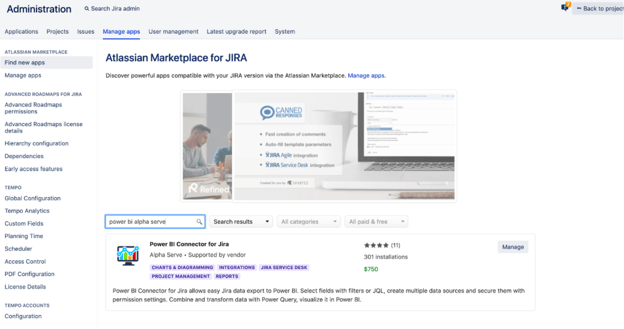

Within the connector settings, administrators can configure user access, adjust permissions, and manage global settings. This ensures compliance and data security while maintaining flexibility for analysts and developers.
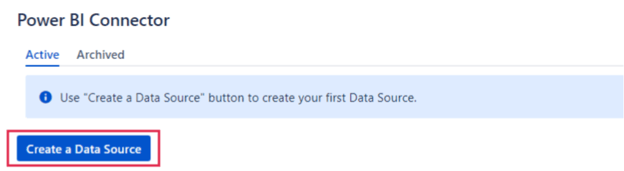
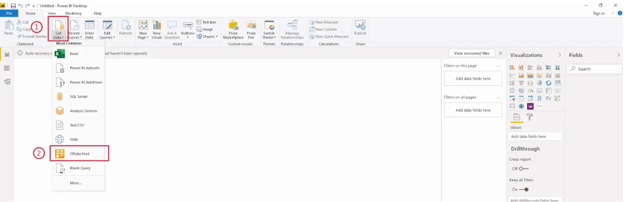
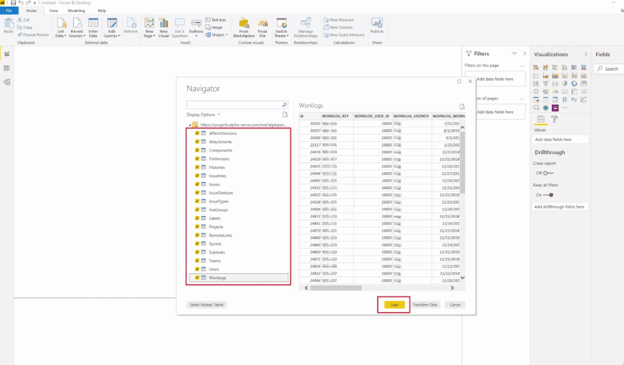
Your Jira data will now be available in Power BI for visualization, dashboard creation, and performance tracking.
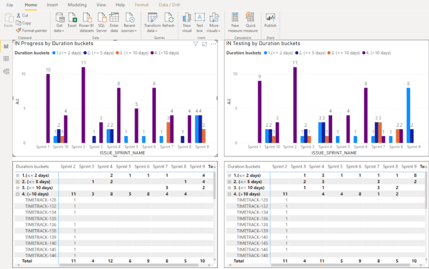
Power BI can visualize how long issues remain in each Jira status.
If items linger too long in “In Progress,” it might indicate resource constraints or process inefficiencies. These insights help leaders address root causes and improve throughput.
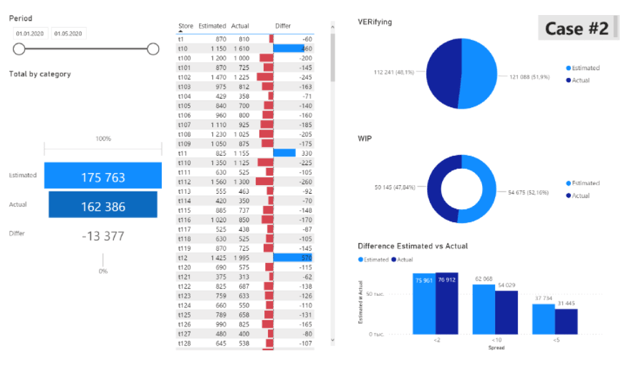
Power BI allows businesses to compare planned timelines with actual effort recorded in Jira.
By identifying discrepancies, managers can refine estimations, optimize workloads, and improve forecasting accuracy.
Integrating Jira with Power BI bridges the gap between daily operations and strategic decision-making. With the Power BI Connector for Jira, organizations gain a unified view of project data, enabling deeper analysis, better reporting, and continuous improvement.
As an Atlassian Platinum Solution Partner, demicon helps enterprises unlock the full potential of Jira and Power BI — from technical setup to data governance and advanced analytics strategies.


Do you have any questions or would like personal consultation? Our expert will be happy to assist you.
.png)
DEMICON : Mar 8, 2022, 8:15:41 AM
Jira Work Management, formerly known as Jira Core, is a powerful working tool with multiple functionalities that enables intuitive work and...

DEMICON : Oct 20, 2025, 3:39:08 PM
Barcelona was once again the stage for the future of digital collaboration this year. We were there in person and were able to experience live how ...

DEMICON : Jan 29, 2025, 9:52:39 AM
Discover how the Atlassian Assets Data Manager can revolutionize the management of your company's assets. {% module_block module...